


The uaPLUS Server consists of the components:
- Generic OPC Server Application ( uaPLUS.Net4.exe )
or the generic OPC Server DLL ( uaPLUS.Net4.dll ) - Customization assembly DLL ( NSPluginNet4.dll )
this is a .Net assembly the can also be used with the Advosol OPC DA and XML DA server toolkits.
The development of an uaPLUS based UA server is basically the implementation of the NSPlugin.dll plug-in .NET assembly.
This is best done by
- creating a new Visual Studio project with the uaPLUS template
- Select the best matching sample solution as the starting point
|
The generic server manages the OPC UA client interface and the internal data model. The customization part handle the device interface. The 'device' doesn't need to be a hardware component, it can be a networked device, a database or another software application. A set of customization interface methods handle:
The Refresh thread in the customization plug-in updates the server cache.The scanRate argument of the NSPlugin AddItem() method defines the minimal sampling interval for UA monitorItems. Shorter client requested sampling intervals are revised up to the scanRate argument value for the item. The uaPLUS generic server doesn't have a common client update thread as the classic OPC DANSrv generic server has. The NSPlugin updateRate definition is not used in uaPLUS. The write to the device is handled only when a client executes a write function. There is no periodic refresh of output items. The DANSrv Professional Edition provides additional methods to optimize the refresh handling according the client access and OPC DA V3 sampling rate settings. This allows to refresh some items less often or not at all for items that are currently not used by any client. The customization module can be implemented in widely different ways to accommodate the application. The item declaration can be done statically at startup or dynamically when the client first accesses the item. |
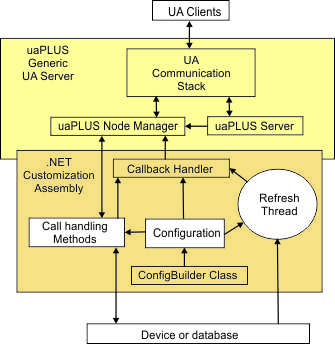 |
Server Address space organization
The NSPlugin.dll assembly defines the application specific objects (items) in form of a tree structure as it is in OPC DA servers.
The uaPLUS generic server creates UA nodes in a matching structure.
The items are defined as a fully qualified identifier string with, by default, the decimal point '.' as the delimiter for the branch structure.
From the fully qualified item identifier the uaPLUS generic server builds all the necessary UA nodes and references.
E.g. the item definition "aaa.bbb.ccc" builds the UA node structure:
Objects
root for plug-in (the name is defined in the UA server configuration)
aaa
bbb
ccc
The items can be defined in code for a simple server, read from a configuration file or read from the handled devices or other sources.
Application specific Configuration
This configuration defines settings and options of the plug-in DLL and the Generic Server - Plug-in DLL interface.
These settings are in the application configuration file. The .NET application configuration files have the same name as the application executable with the extension .config appended.
The configuration file name for uaPLUS is uaPLUS.exe.config respectively uaPLUS.Net4.exe.config
The Advosol server toolkits for UA, Xi, OPC DA, XML DA use the same plug-in DLL. The different generic servers have slightly different configuration requirements. For the plug-in DLL to work properly with different generic servers, configuration settings need to be defined even if they are not used by a particular generic server.
E.g. the CLSID/ProgId definitions are used for OPC DA servers (for the server registration) but are not used by the uaPLUS server.
The application specific server configuration consists of two main parts:
The customization module file IGeneric.cs/vb contains wrappers for the callback methods and default implementations of all methods called by the generic server. It is recommended not to modify this file but to implement a method overload in the file ServerAdapt.cs/vb for all methods that need to be customized.
The configuration methods are:
This methods contain the code to select the mode settings selected in the DANSrv project generation wizard.
Additionally these methods try to read definitions from the file uaPLUS.exe.config and use these definitions if found.
The DANSrv project generation wizard creates a configuration file with the settings according the selection in the wizard GUI. The configuration file is only required if the settings need to be changed without a recompilation.
Sample DANSrv.exe.config file:
| <?xml version="1.0" encoding="utf-8" ?> <configuration> <appSettings> <!-- Server registry definitions --> <add key="ClsidServer" value="{38E22F8D-F91D-49F1-86FD-E47740A4F1D3}"/> <add key="ClsidApp" value="{38E22F8D-F91D-49F1-86FD-E47740A4F1D3}"/> <add key="ServerProgID" value="TS.CSMinimalDA"/> <add key="CurrServerProgID" value="TS.CSMinimalDA.1"/> <add key="ServerName" value="TS.CSMinimalDA DA Server"/> <add key="CurrServerName" value="TS.CSMinimalDA DA Server"/> <add key="CompanyName" value="Advosol Inc."/> <!-- Server operation definitions --> </appSettings> </configuration> |
If an application requires the configuration settings to be handled differently then the configuration methods should be implemented in the ServerAdapt.cs/vb file and overload the default implementation in IGeneric.cs/vb.
If the ConfigBuilder Class option is checked in the DANSrv project creation wizard then the GetServerParameters() default implementation in IGeneric.cs/vb tries to load the DANSrv.Items.xml file, first the external file and if it's not found tries to load the items from the embedded file.
The sample code in ServerAdapt.cs/vb uses the loaded configuration and creates the items defined in the XML file. After the items are created the server is functional and typically a thread is started that handles the device access and the refresh of the server cache.
| new public int CreateServerItems( string commandLineParams ) { // Create all items supported by this server. // The DANSrv.Items.XML configuration file was loaded in GetServerparameters int rtc = Config.CreateServerItems( cbAddItem ); if( HRESULTS.Succeeded(rtc) ) { // Create a thread to simulate signal changes and update the server cache. // In real applications this thread reads data from the device. myThread = new Thread( new ThreadStart( UpdateThread ) ) ; myThread.Name = "Item Update/Simulation" ; myThread.Start(); } return rtc; } |
If no XML item definition file is accessible then the items have to be defined in some other way, either statically or dynamically.